Netsbee vs Fing: 9 Important Differences That Make Netsbee Better
Netsbee vs Fing is one of the most useful comparisons for anyone trying to understand what is really on a home network. Both apps can find connected devices, but they do not feel the same in practice. Fing presents itself as the larger, older toolkit. Netsbee takes a more focused route, prioritising speed, clarity, smarter device recognition, and a more privacy-aware design.
Quick answer
Netsbee is the better choice for most home users who want an easier way to recognise devices, spot unusual activity, and keep track of a network even when IP addresses change.
Fing still suits users who want a broader, more traditional, multi-platform toolkit, but it can feel heavier and more generic in day-to-day use.
Netsbee vs Fing: What Is the Real Difference?
The biggest difference in this comparison is not simply the number of features on paper. It is how much useful meaning each app gives you once a scan is complete. A network scanner becomes valuable when it helps you answer basic questions quickly: What is this device? Does it belong here? Has something changed? Should I care?
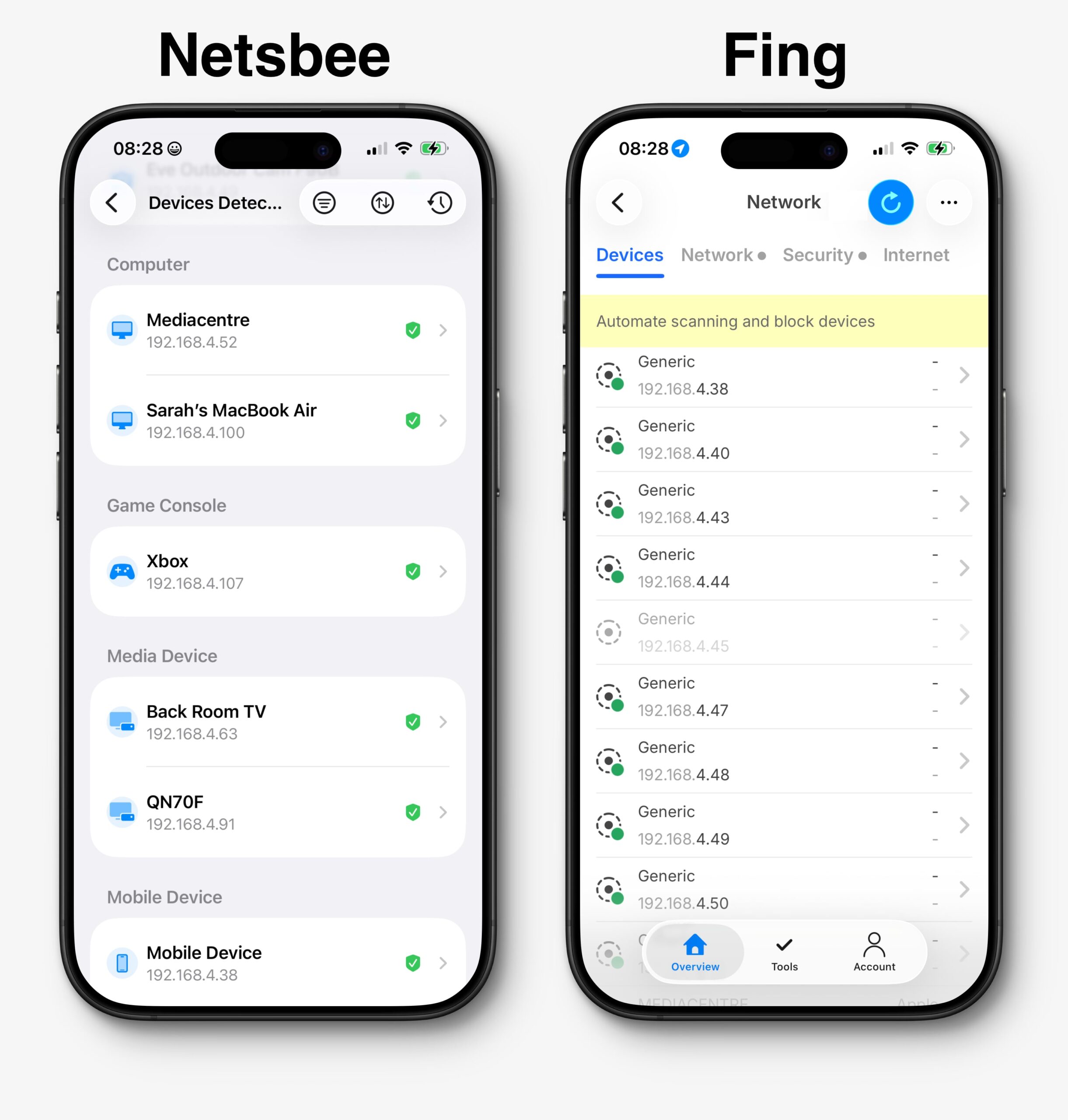
Netsbee is built around answering those questions more directly. Instead of leaving users to interpret long lists of vague or generic entries, it focuses on turning scan data into something easier to understand. That makes a real difference on a busy home network filled with phones, tablets, TVs, cameras, smart speakers, gaming devices, and appliances.
Fing, by contrast, remains a well-known and capable name in the category, but its broader utility-style approach can feel heavier. It may offer more breadth in some areas, yet that breadth does not always translate into a clearer everyday experience and requires extra hardware. For many users, clarity matters more than sheer feature count.
Netsbee vs Fing Comparison Table
| Comparison area | Netsbee | Fing |
|---|---|---|
| Overall feel | Lightweight, modern, and easier to understand quickly | Broader toolkit with a more layered utility feel |
| Platform experience | Purpose-built for iPhone and iPad with a more native SwiftUI-style experience | Cross-platform focus with a larger, more general product feel |
| Device recognition | Works harder to identify what a device actually is, often with more meaningful names | Can show more generic labels that still require user interpretation |
| Handling IP changes | Better continuity when the router reassigns IP addresses | More likely to lose context and show devices as unfamiliar |
| Privacy positioning | Uses Cloudflare edge processing to keep external checks closer to the user | More cloud and account oriented within a broader platform model |
| Ease of use | Designed for clarity and practical answers | Better for users comfortable reading a traditional utility interface |
| Best for | Home users who want clearer insight and faster understanding | Users who prefer a broader, multi-platform network toolkit |
Why Netsbee Stands Out in Real-World Use
Netsbee feels different because it is not only trying to discover devices. It is trying to help users understand their network with less friction. That distinction matters. Most people are not looking for more technical output. They are looking for answers they can trust.
- More useful device labels: A camera should feel like a camera, not just an anonymous network entry.
- Smarter continuity: When IP addresses change, recognised devices can still remain recognisable.
- Cloudflare edge processing: External checks are handled closer to the user, reducing unnecessary data movement and supporting a privacy-first story.
- Security-oriented design: Netsbee leans into practical exposure awareness, not just device listing.
- More nimble user experience: The app feels lighter and faster to interpret, which matters when you want quick insight.
Netsbee strengths
- Clearer device identification
- Better handling of IP address changes
- More guided and modern interface
- Stronger privacy narrative
- Better fit for non-technical households
Why that matters
- Less time spent guessing what is on the network
- Less confusion after router restarts
- Easier to spot unusual or unknown devices
- More confidence in scan results
- More usable day to day
Where Fing Falls Behind
Fing still has brand recognition and breadth, and that can be useful. However, this comparison is not just about who has the longest feature list. It is about what the user gets from a scan. In that respect, Fing can feel less polished in practice.
- Generic device listings: Some entries can remain vague enough that users still have to investigate manually.
- Heavier overall feel: The product can seem bigger and more layered, which makes it feel slower to interpret.
- Less continuity after change: When DHCP leases move around, previously recognised devices can lose their identity.
- More utility than guidance: Good for enthusiasts, but not always the most approachable for everyday users.
Why this matters for home users
Most home networks are dynamic. Devices reconnect all day. Phones disappear and return. Cameras sleep and wake. TVs, consoles, and smart home gear shift around. In that environment, a scanner that focuses on the device itself is more useful than one that feels tied to the temporary address the router gave it that day.
The Router Restart Test: The Biggest Differentiator
The most revealing part of the side-by-side comparison came after restarting the router. Once the network handed out fresh IP addresses, Netsbee continued to recognise devices and reassigned them more cleanly. That made the network feel consistent, even though the addresses underneath had changed.
Fing, by contrast, was more likely to lose that continuity. In practical terms, that means a user may look at the scan and see devices that feel new, unfamiliar, or more generic than before. That creates extra work and reduces confidence in the results.
For many households, this is the real test. Networks are not static. Routers reboot, power flickers, leases expire, and devices reconnect. An app that keeps up with that reality will feel much smarter in daily use.
Which App Is Better for Everyday Use?
Day to day, the better app is the one that gives clearer answers faster. That is where Netsbee has the edge. It reduces the gap between raw scan data and user understanding. You spend less time trying to work out whether a device belongs to your TV, your camera, or your neighbour’s unexpected gadget, and more time acting on useful insight.
Netsbee also benefits from a more focused user experience. It feels made for users who want clarity without losing useful technical depth. That matters because many people care about network security but do not want to use a traditional-looking utility every time they check what is connected.
Fing still has value for users who want a broad multi-platform toolkit, but the broader product shape can make it feel less nimble. It is more likely to appeal to users who are happy doing more interpretation themselves.
Who Should Choose Netsbee and Who Should Choose Fing?
Choose Netsbee if you want:
- Clearer identification of devices on your network
- Better continuity when IP addresses change
- A more modern, iPhone-first experience
- External checks with a privacy-first positioning
- A scanner that feels more guided and less generic
Choose Fing if you want:
- A broader multi-platform toolkit
- A more traditional network utility style
- A bigger ecosystem rather than a lighter experience
- Extra breadth even if interpretation takes longer
Final verdict
- Netsbee wins this comparison for most home users because it gives clearer device identification, stronger continuity after router changes, and a more modern, privacy-aware experience.
- Fing remains a capable alternative, but it feels heavier, more generic in places, and less focused on turning scan results into instant understanding.
Frequently Asked Questions
Is Netsbee better than Fing for home users?
For many home users, yes. Netsbee is easier to understand at a glance, does a better job of keeping device identity consistent when IP addresses change, and has a more privacy-conscious positioning.
Why does Netsbee feel more useful after a router restart?
Because the app focuses more on the device itself rather than only the current IP address. When the router hands out fresh addresses, Netsbee can continue to map recognised devices more smoothly.
Is Fing still worth using?
Yes, especially if you want a broad, multi-platform toolkit and do not mind a more traditional utility-style experience. It is still a well-known option, but it may not feel as clear or as nimble for everyday home use.
Why is privacy important in a network scanner?
A network scanner can reveal meaningful information about the devices in a home. A design that avoids unnecessary data movement and keeps external processing closer to the user can be more reassuring for privacy-conscious households.
Related comparisons and guides
Explore the Netsbee features page to learn more about device recognition, deep scanning, and exposure checks. For general background on networking, see this overview of local area networks.
Suggested URL slug: /netsbee-vs-fing
Suggested focus keyword: netsbee vs fing